01 · Your time

The whole case,
in one file.

One file per case with its parties, court numbers, hearings, documents and fee agreement; one calendar for hearings and tasks; and a lawyer portal designed for the phone.

“Focus on your cases” · Tibyan film 01 Narrated in Arabic · under a minute
The film’s script

Every minute you spend following up on admin is a minute taken from your professional time.

Between court hearings, drafting memoranda, client meetings and keeping track of dates, the responsibilities multiply, and focus becomes the challenge.

With Tibyan, your legal work is organised on one platform.

A calendar that brings together your appointments, hearings and tasks, and your case files at hand with all their details and documents.

Record hearing outcomes, set the next dates, and follow your work from one place.

Because the value of a lawyer’s time lies in their legal expertise, not in being busy with admin.

The film is narrated in Arabic; this is its script in English.

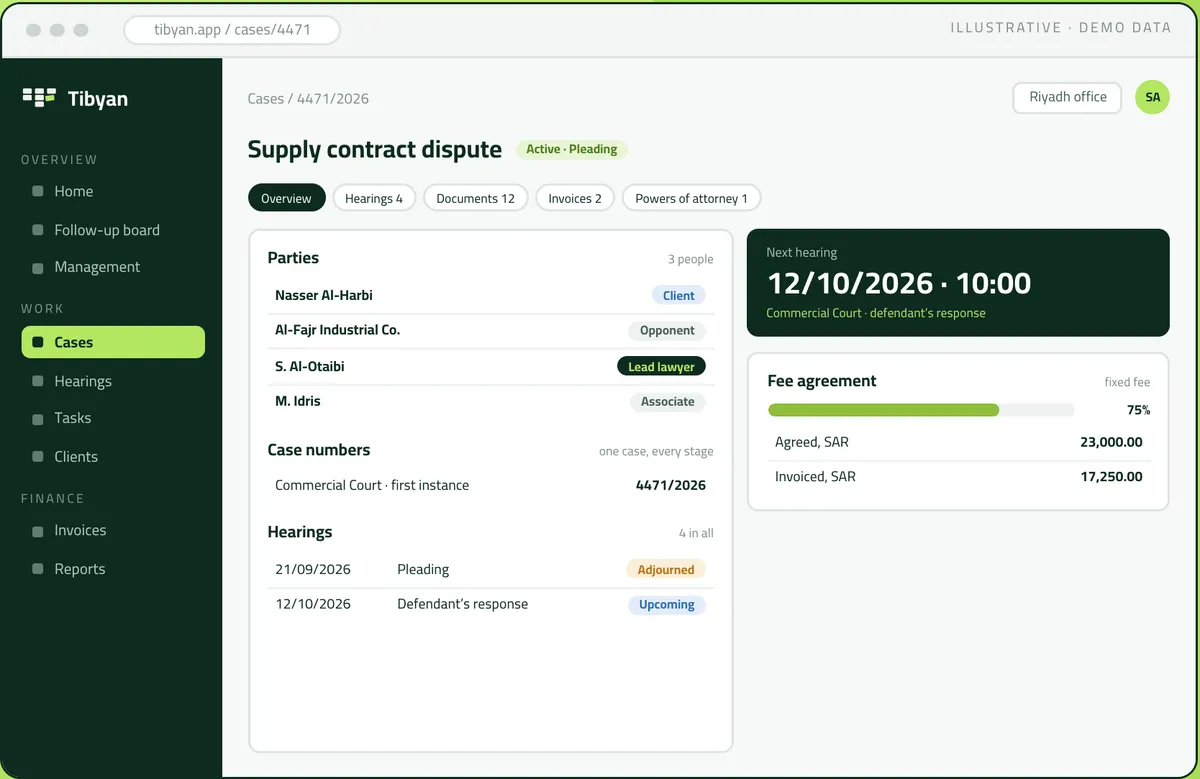
The case file in Tibyan: parties, case numbers, hearings and the fee agreement (demo data)
Illustrative · demo data
The case file

A case is not a number on a list.

It is its parties, its courts, its hearings, its papers and its agreed fees, and Tibyan keeps them together.

01

Parties

Any number of clients and opponents, and the team of lawyers handling the case, each in their role.

02

Case numbers

A number for each court and stage, so the case stays one case from first instance through appeal.

03

Documents

Folders and files for each case. Every file is either shared with the client or kept internal.

04

Fee agreement

Fixed or percentage fees, and an agreement printed in Arabic or English from your office’s template.

05

Hearings

Every hearing with its court, reason and outcome. An adjournment sets the date of the next one.

06

Powers of attorney

Each one on file with its expiry date, and flagged thirty days before it lapses.

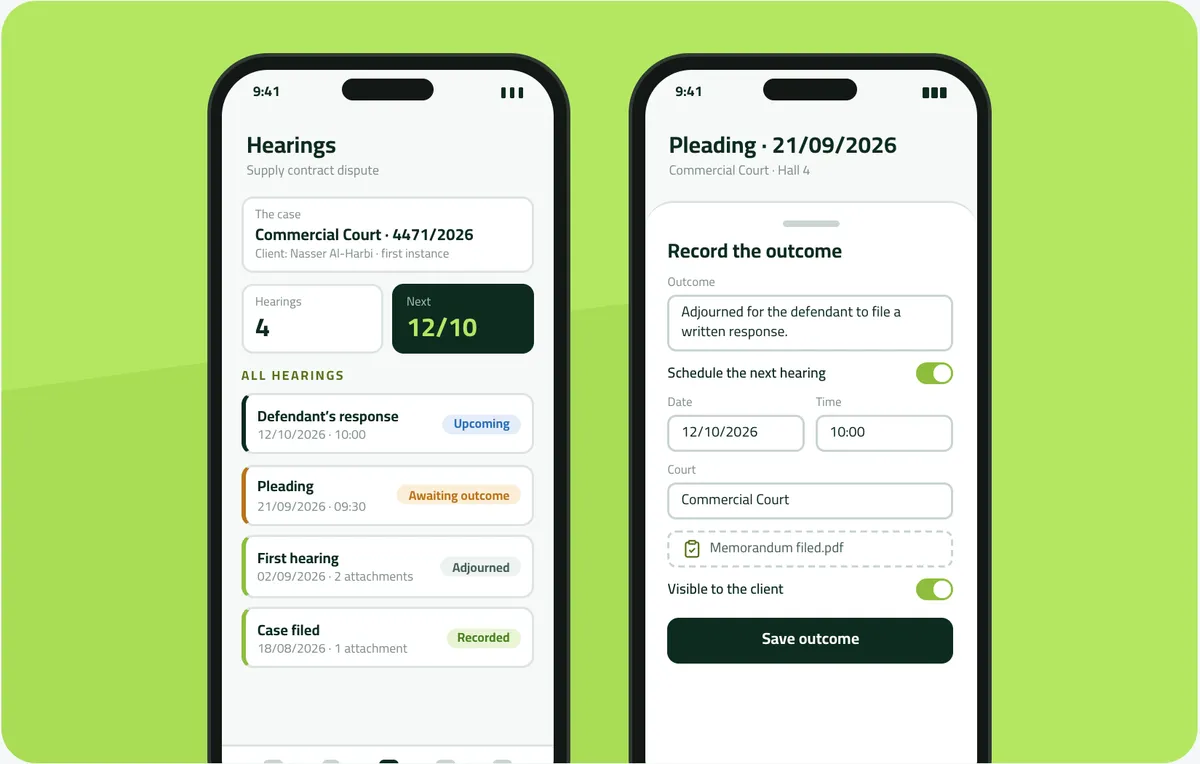
The case’s hearings and the outcome window in Tibyan, where the next hearing is set from the same window (demo data)
Illustrative · demo data
The hearing

The hearing, and its outcome.

Record a hearing’s outcome in one window, and if it was adjourned, set the next date the moment the hearing ends.

01 · One window

The outcome sits on the hearing

Write it on the hearing itself, from the register, the case page or the lawyer portal. No separate minutes file to keep in step.

02 · The next hearing

An adjournment sets the next date

The next hearing goes into the calendar from the same window, so no case drops out of the diary.

03 · Client visibility

The office decides what the client sees

Every hearing, document and case number has a visibility switch. Nothing reaches the client portal unless the office allows it.

04 · Attachments

Papers stay with their hearing

The judgment, the memorandum and the notice of service are attached to the hearing they belong to, and visible from the register.

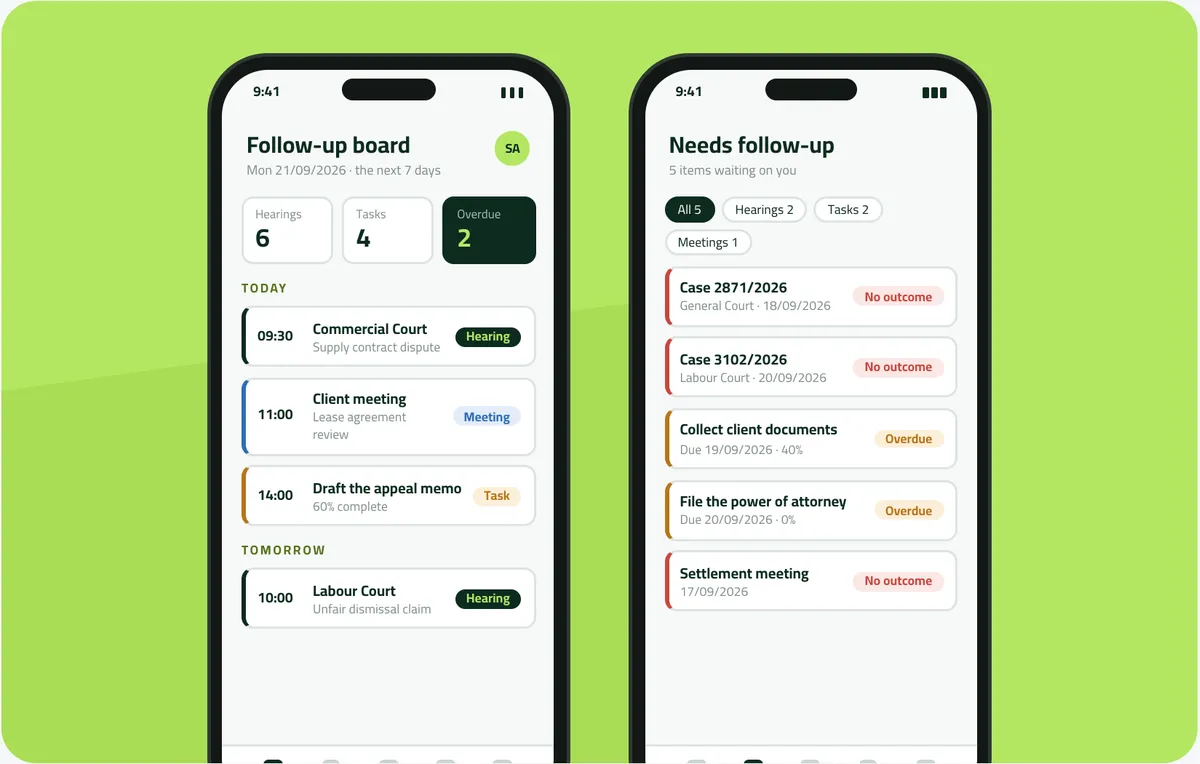
The lawyer portal on a phone: the week and today, and what is waiting on this lawyer (demo data)
Illustrative · demo data
The lawyer portal

The lawyer’s day, on their phone.

The next seven days of hearings, tasks and meetings, what is overdue, and the caseload of the lawyer who signed in, and nobody else’s.

01 · The seven days

The week on one screen

Every hearing, task, meeting and consultation on its day. A task that runs all week appears once, among the tasks in progress.

02 · What is late

Nothing slips past

A hearing that passed without an outcome, or a task past its date and not done, shows as overdue by itself.

03 · The morning email

The agenda in your inbox

A daily message at the hour the office chooses, with today’s, tomorrow’s and the coming days’ appointments, times and places.

04 · A separate permission

Viewing is not editing

The follow-up board shows the whole picture without allowing edits; changes are made from the lawyer portal. The office grants each.

A day in practice · The lawyer Illustrative · demo data

The moment the hearing ends

Monday 21 September. At the hour the office chose, the lead lawyer on Nasser Al-Harbi’s supply contract dispute receives the day’s agenda by email: the 09:30 online pleading before the Commercial Court, an 11:00 client meeting on a lease agreement review, and the appeal memo, 60% drafted, at 14:00. Before the hearing, they ask Najeeb a question on liability for late delivery under a supply contract, at balanced depth, and read the answer.

The court adjourns for the defendant to file a written response. As soon as the online session ends, while the details are still fresh, the lawyer opens the hearing in Tibyan, writes the outcome, and in the same window sets the next hearing: 12 October 2026, 10:00, Commercial Court. The memorandum they filed is attached to the hearing. The visibility switch stays on, so the client will see it.

Nothing is left for later. The hearing never lands on anyone’s “held, no outcome” list, the case keeps a next date in the calendar, the 12 October hearing will come up in the morning email as it approaches, and nobody at the office has to ask how it went.


Questions

Frequently asked questions

Can I record a hearing’s outcome and set the next hearing in one step?

Yes. The outcome is written on the hearing itself, and if it was adjourned the next hearing is set from the same window, so it goes straight into the calendar and the case never drops out of the diary.

Does a case stay one case through appeal?

Yes. Each court and stage has its own number inside the same case, so it stays one case from first instance through appeal.

How does a lawyer see their day?

The lawyer portal shows the next seven days of hearings, tasks and meetings, and a daily email at the hour the office chooses lists today’s, tomorrow’s and the coming days’ appointments with times and places.

Does Tibyan flag expiring powers of attorney?

Yes. Each power of attorney is kept with its expiry date and appears on the follow-up list thirty days before it lapses, without anyone setting a reminder.

Two Saudi professionals shaking hands
Your first week

You argue the case.
Tibyan follows it up.

Start with one office, then every branch. Send us a list of your open cases and a week of your calendar. We will set Tibyan up with your team and show you that week as they would have lived it.

  1. 01 You send

    A list of your open cases and one week of your calendar.

  2. 02 We set up

    Tibyan with your team, your letterhead and your templates, in Arabic.

  3. 03 You see

    That week as your team would have lived it in Tibyan.

hala@tebyan.sa +966 11 411 0394 Riyadh, Saudi Arabia